
Regular expressions are powerful—and notoriously unforgiving.
One missing escape, one greedy quantifier, and suddenly:
- Your validation lets bad data through.
- A refactor breaks a feature that “used to work”.
- You spend 30 minutes tweaking symbols that look like noise.
This article is for those moments. Instead of copy-pasting patterns from Stack Overflow and hoping they work, we will look at a simple, repeatable way to design and test regex so you can trust it in production.
We will cover:
- Why regex patterns so often become brittle
- A practical workflow for designing and refining patterns
- Concrete examples for email, URL, and whitespace
- How a regex tester helps you debug faster and safer
Why Regex So Often Breaks in Real Projects
In many teams, regex appears as a “small detail” inside a feature:
- Email validation in a sign-up form
- URL detection in a rich-text editor
- Trimming extra whitespace before saving to the database
Because the use cases look simple, the pattern is usually written in a hurry:
- No clear list of examples that should pass and fail
- Pattern copied from an answer that solves a slightly different problem
- No easy way to see how it behaves when requirements change
Over time, you end up with:
- Patterns that are too loose (invalid data slips in)
- Patterns that are too strict (valid data gets rejected)
- Patterns that nobody dares to touch during refactoring
Before we talk about tools, it helps to see some concrete examples.
Common Regex Patterns That Cause Headaches
The three most common “problem areas” in everyday web development are:
- Email addresses
- URLs
- Whitespace and invisible characters
The infographic below summarises some simplified patterns and typical pitfalls.
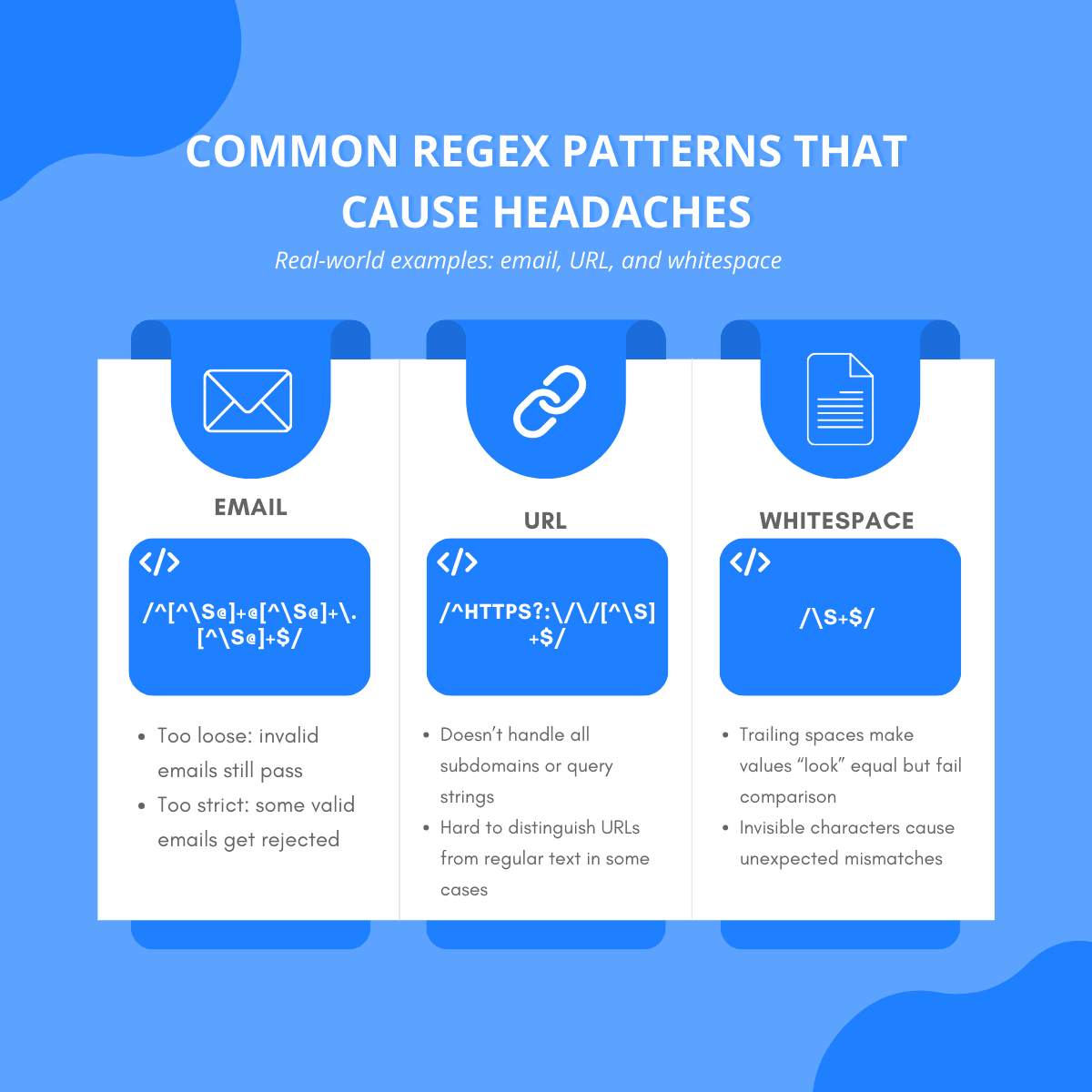
A few key takeaways:
- Email patterns that try to be “perfect” often become unreadable and still miss edge cases. Start simple, then tighten if your domain really needs it.
- URL detection should reflect your real use case. Are you matching only
http/httpslinks, or any protocol? Do you care about query strings and anchors? - Whitespace issues are subtle. Trailing spaces, tabs, and non-breaking spaces can make two values look identical while failing equality checks or regex matches.
Instead of hunting these issues directly in your application, it’s much more efficient to work in a small, focused environment.
A Healthy Workflow for Building Regex
A reliable regex rarely comes from a single attempt. It’s the result of several small iterations.
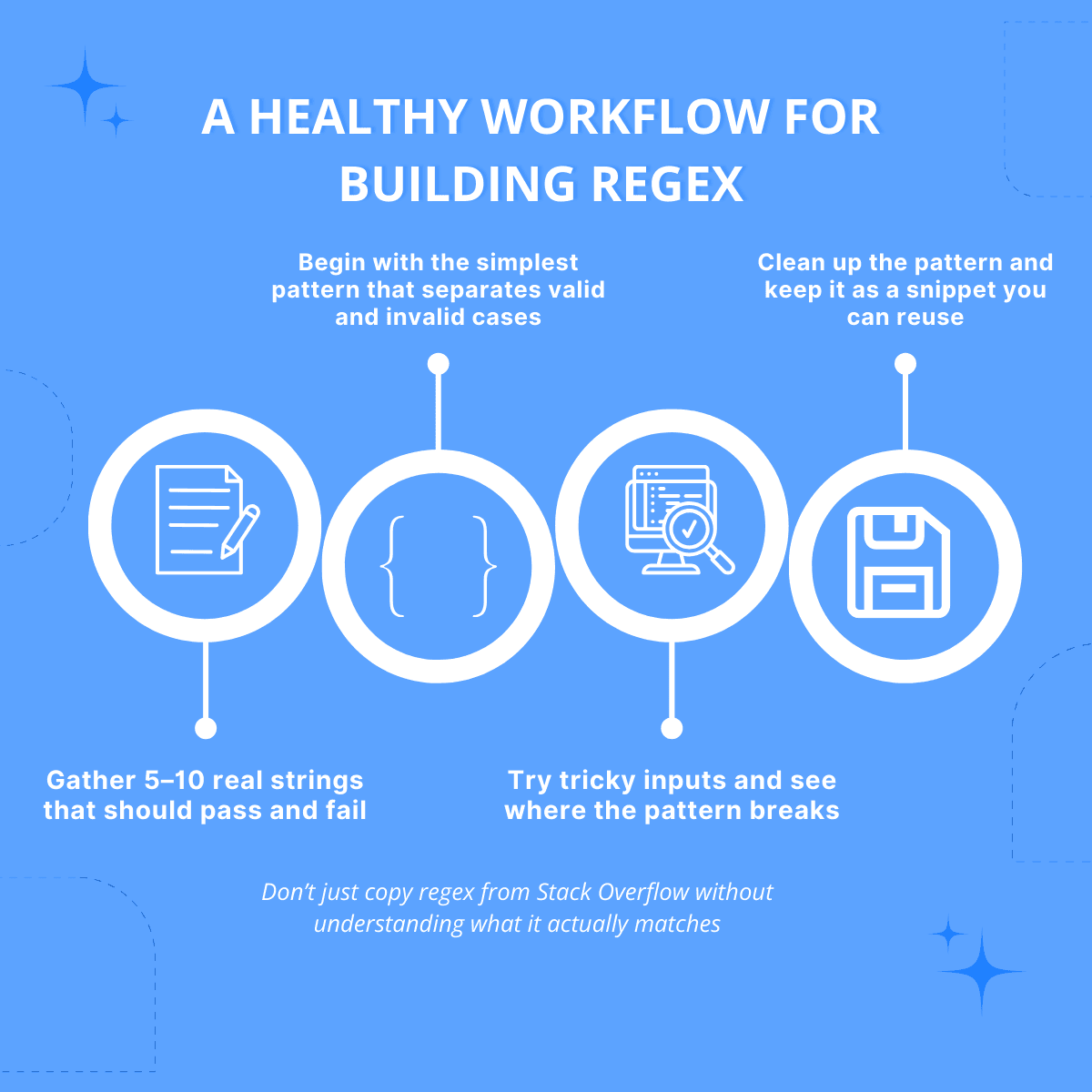
A practical workflow:
1. Gather 5–10 Real Strings
Include both valid and invalid examples:
- Valid: data you expect to accept
- Invalid: data you absolutely must reject
Real strings from your logs or test data are better than invented ones, because they reflect how users actually behave.
2. Start With the Simplest Pattern
Begin with the smallest pattern that separates valid and invalid cases. For example:
/^[^\s@]+@[^\s@]+\.[^\s@]+$/for a basic email. It’s not perfect, but it’s:
- Easy to read
- Easy to test
- Easy to extend later
3. Try Tricky Inputs and See Where It Breaks
Add “edge case” examples:
- Extra dots, plus signs, unusual but valid domains
- URLs with query strings and fragments
- Strings with tabs, newlines, or non-breaking spaces
Don’t optimise for perfection immediately. Optimise for visibility: you want to see clearly which cases pass and which ones fail.
4. Clean Up and Save as a Reusable Snippet
Once the pattern behaves well on your examples:
- Clean up redundant parts
- Add comments next to the regex in your code (or above it)
- Store it as a snippet you can reuse across projects
Don’t just copy regex from Stack Overflow without understanding what it actually matches.
Why a Regex Tester Beats console.log Loops
You can test regex directly in code with a loop and console.log. It works—but it’s slow and noisy, especially when you’re under time pressure.
A dedicated regex tester lets you:
- Edit the pattern and test strings side-by-side
- See matches and groups highlighted visually
- Toggle flags (
g,i,m) without editing the pattern itself
Key components:
- Pattern Field - where you wite
/your-regex-here/ - Flags -
g,i,mtoggles - Test string area - multi-line input with sample data
- Matches / Groups / Explain tabs - so you can inspect how the pattern behaves
With this setup, you can stabilise a pattern before it reaches your application code
Practical Tips for Day-to-Day Use
A few guidelines to keep your regex usage sustainable:
Prefer Readability Over Cleverness
A slightly longer, clearer pattern is better than a “golfed” version that nobody understands six months later.
- Use grouping and comments
- Break complex logic into smaller steps when possible
Keep Examples Close to the Pattern
If a regex is critical (e.g., security checks, core business rules), keep its test cases close:
- As unit tests in your codebase
- Or in a shared regex tester link that the team can revisit
Avoid Using Regex for Everything
Regex is not always the right tool. Avoid it when:
- Parsing full HTML or JSON (use a proper parser instead)
- Validating very complex business rules that are easier to express in code
Use regex for pattern matching, not for entire parsing logic.
Using Our Regex Tester (Optional, Not Mandatory)
There are many regex tools available online—use whichever fits your workflow.
If you want a lightweight option that fits the workflow in this article, we also provide a Regex Tester & Validator you can open in a separate tab:
- Test patterns against multiple sample strings
- See matches and groups highlighted
- Quickly toggle flags and copy results back into your code
You can try it here: [/tools/regex-tester] (url) (or via the Tools menu on our site).
Closing Thoughts
Regex will probably never feel “pretty”, but it doesn’t have to be painful.
By:
- Collecting real examples
- Starting simple
- Iterating in a visual tester
- Saving stable patterns as reusable snippets
you can turn regex from a source of bugs into a quiet, dependable part of your toolkit.
The next time a pattern keeps breaking at the last minute, step back, open a tester, and follow the workflow above. Your future self—and your teammates—will thank you.