Choosing software for your business often feels like a once-in-a-lifetime decision. Pick the wrong one, and the team becomes frustrated, processes get more complicated, and money is wasted on licenses or projects that never get adopted. At the same time, business needs evolve: new branches, new sales channels, more complex reporting.
This article helps you answer one key question:
Should your business rely on ready-made SaaS software, or is it time to invest in custom-built software tailored to your workflow?
We’ll use two visual tools:
- Decision diagram — when SaaS is enough, and when custom is justified
- Comparison table — pros, cons, and fit for each option
Common Problems When Choosing Software
Before diving into diagrams and comparisons, let’s look at the patterns we frequently encounter when businesses choose software:
- Adopting popular tools simply because “everyone uses them,” without evaluating fit
- Forcing internal processes to match tool limitations, until the team feels “boxed in”
- Using too many disconnected apps, spreading data everywhere
- Building large custom systems without clear requirements, leading to unmaintainable projects
These issues often start from one root cause: a lack of a clear decision framework when choosing between SaaS and custom.
SaaS vs Custom Software: Quick Definitions
What is SaaS?
Software as a Service (SaaS) is ready-made software accessed via the internet with a subscription model. Examples: cloud POS, CRM, HRIS, online accounting tools.
Key characteristics:
- Features predetermined by the vendor
- Fast implementation — sign up and configure
- Lower upfront cost, with ongoing subscription fees
What is Custom Software?
Custom software is a system designed and built specifically around your business processes and needs.
Key characteristics:
- Features follow your workflow, not the other way around
- Can integrate deeply with existing systems
- Requires upfront investment and long-term maintenance commitment
Decision Diagram: Custom Software or SaaS?
To guide internal discussions, start with the most fundamental question:
“Can this need be solved by an existing general-purpose tool?”
If the answer is yes, and the workflow is standard and straightforward, then SaaS is likely enough.
If not — especially when unique integrations or complex workflows exist — it’s a strong signal that custom software becomes relevant.
Use the diagram below as your guide:
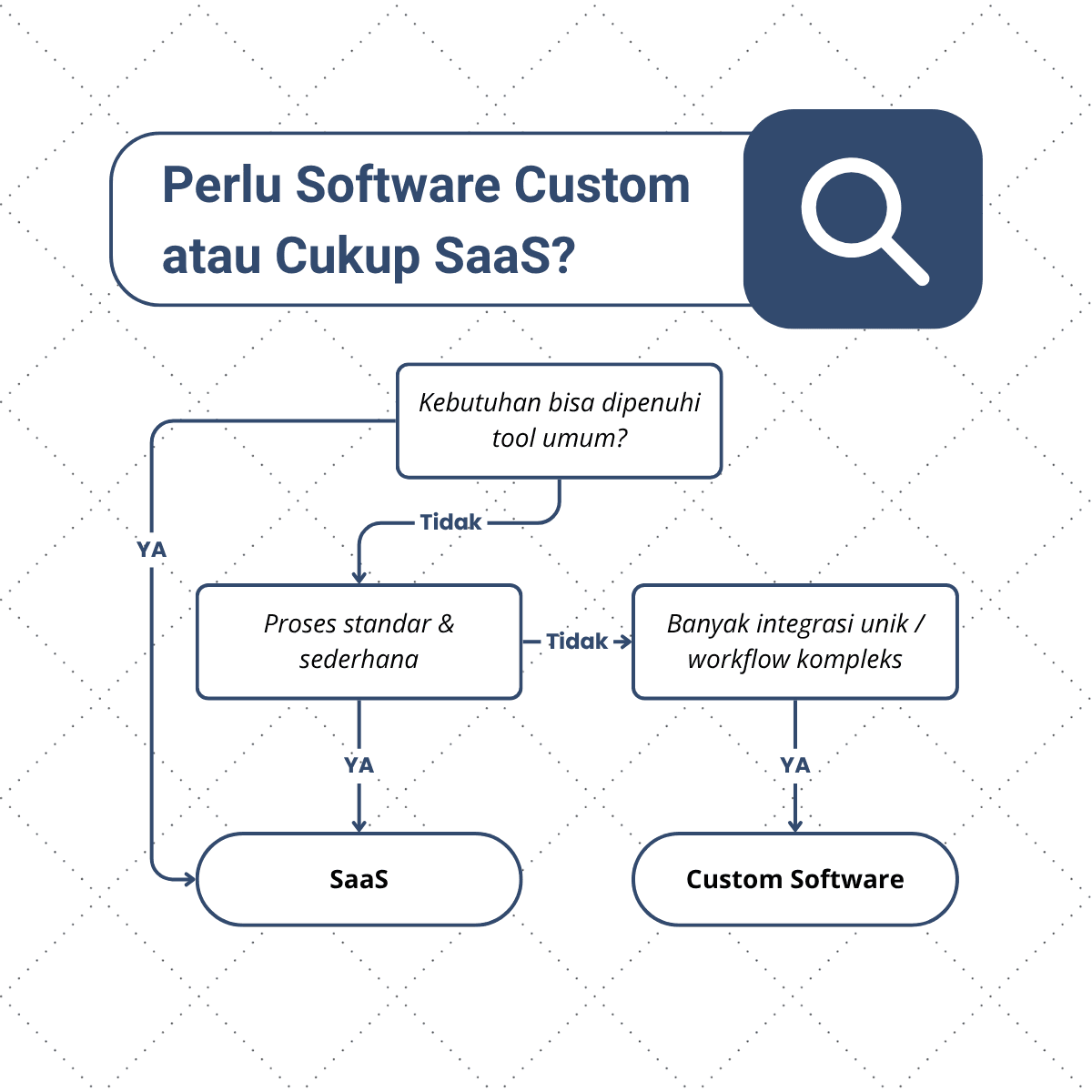
Use this diagram during internal meetings:
- Mark real use cases in your business (POS, procurement approvals, production tracking)
- See where each use case lands in the diagram
- Not everything should be custom — keeping part of the stack on SaaS is healthy
SaaS vs Custom Software – Quick Comparison
Once you understand the decision flow, here’s a summary comparing SaaS and custom software across implementation, cost, flexibility, integration, control, and fit.
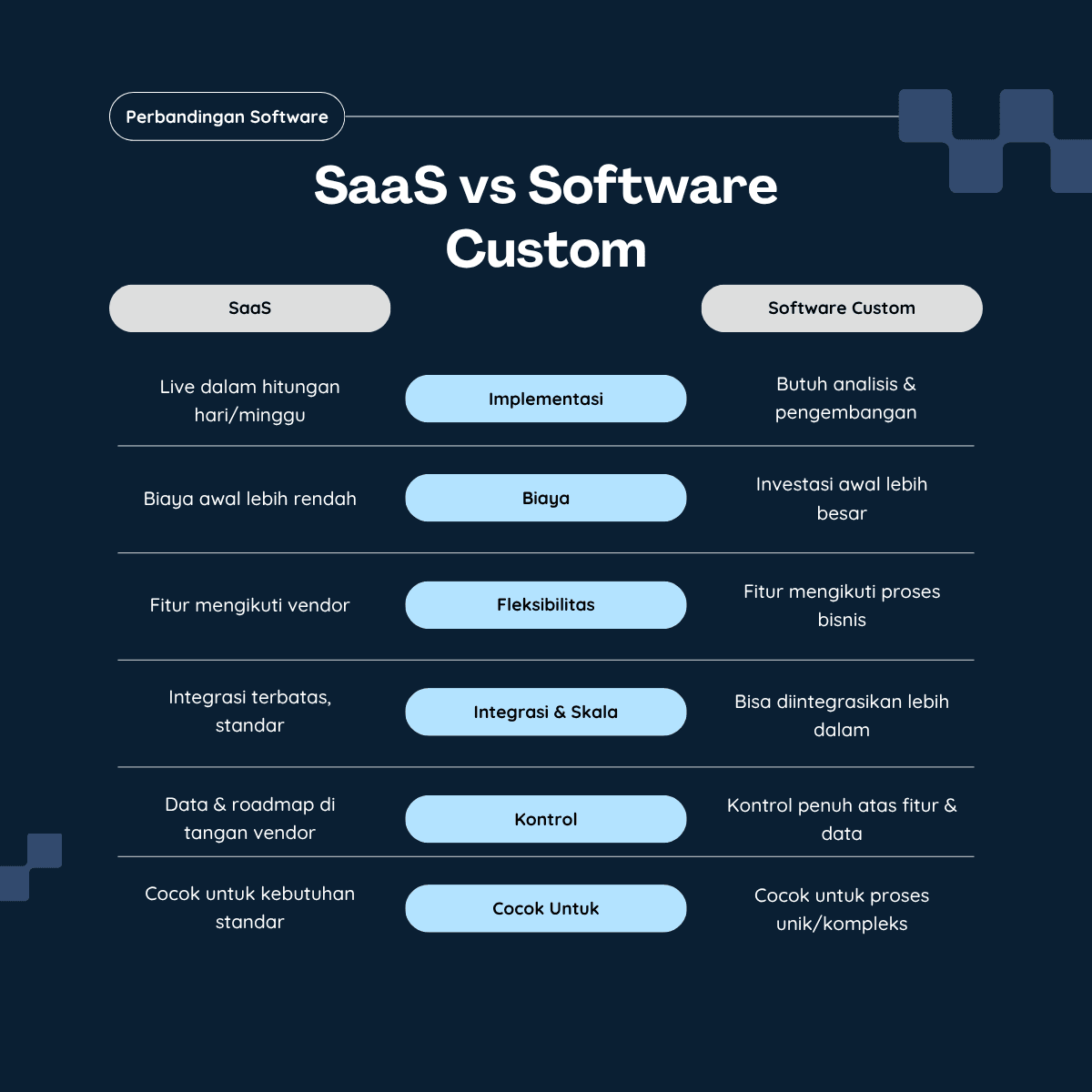
Some important points from the table:
-
Implementation
- SaaS can go live in days or weeks
- Custom requires analysis, design, and development phases
-
Cost
- SaaS has low upfront cost but ongoing subscription fees
- Custom requires a larger upfront investment but may be more cost-effective long-term
-
Flexibility
- SaaS follows the vendor’s roadmap
- Custom lets you build exactly what your business needs
-
Integration & Scale
- SaaS offers standard integrations
- Custom enables deeper integration with internal systems (ERP, warehouse, production, etc.)
-
Control
- SaaS data and product roadmap are controlled by the vendor
- Custom gives full control over features and data
When You Should Choose SaaS
Choose SaaS when most of these conditions apply:
- Your needs are standard, e.g., simple POS, invoicing, basic CRM, typical HRIS
- Speed is the top priority, e.g., validating a new business channel
- Your internal team isn’t ready to manage custom systems
- Budget is limited upfront, and a cancellable subscription model is preferred
- You want to learn industry best practices through established tools
For many SMEs and businesses at the beginning of digitalization, SaaS is the logical first step.
When You Should Invest in Custom Software
Custom software becomes relevant when:
- Your business processes are unique or complex, and these differences drive competitive advantage
- Critical activities rely on manual hacks — Excel sheets, macros, custom logs
- You manage many branches or channels, requiring deep data integration
- You need automation and workflows that SaaS cannot support without heavy workarounds
- You see software as a long-term asset, not a temporary tool
At this stage, custom software isn’t a luxury — it becomes essential to keep the business efficient and scalable.
Practical Strategy: Start with SaaS, Grow into Custom
This decision doesn’t have to be black-and-white. Many of our clients use a gradual approach:
-
Start with SaaS
Quickly validate workflows. Observe real usage patterns and what the team truly needs. -
Identify gaps and workarounds
Note everything that feels inefficient, manual, or poorly integrated. -
Design custom software using real data
Use insights from SaaS usage to architect a more accurate custom system. -
Integrate, don’t replace everything at once
Build custom modules that sit on top of existing SaaS tools — such as a unified dashboard that pulls data from several systems.
This approach reduces risk and creates a clearer investment roadmap.
How We Can Help
At Sono Next-Gen Solutions, we help businesses navigate this entire process:
- Needs assessment — mapping workflows, systems, and scale
- Strategic recommendations — SaaS-only, hybrid, or full-custom
- Design & development — from prototype (MVP) to full rollout
- Long-term partnership — ensuring the system grows with your business
If you’re weighing SaaS vs custom software for your organization, this article is a starting point. For the next step, feel free to reach out — we can help turn your needs into a clear, actionable system roadmap.